These 7 hidden patterns of shot progressions will make it super-easy to get started. Then you can mix it up a bit to suit the exact situation called for in your particular script or story. Much much more in my new 5-week interactive course at http://StoryboardSecretsLIVE.com
Showing posts with label Storyboards. Show all posts
Showing posts with label Storyboards. Show all posts
Discover 7 Hidden Patterns of Successful Storyboards
0 comments
Discover 7 Hidden Patterns of Successful Storyboards — When you begin drawing your storyboards, there’s no need to head into the job with a completely blank slate.

Cartoon Storyboards from the Sixties -- Irv Spector draws Linus the Lionhearted
0 comments

As a storyboard artist, the stuff that gets me most excited are these beautifully loose storyboards from the 1960's TV cartoon, Linus the Lionhearted.
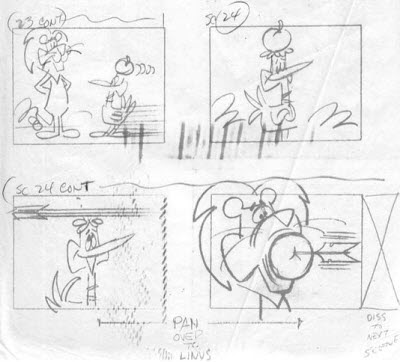
See all the storyboards as well as the story outline, model sheets and animation layout art at the Spectorphile blog at: http://irvspector.blogspot.com/2008/12/irv-spector-at-ed-graham-prods-enter.html
===================
More Irv Spector storyboard art at Cartoon Brew:

Storyboards from Phineas and Ferb
0 comments I’ve just posted
a big ol’ bunch of my storyboards from Phineas & Ferb.
You can find them all
on my storyboarding blog at
http://StoryboardSecrets.com/blog
Here’s a tiny sampling
of what you’ll find on the storyboarding blog…


First-Ever Photos of the Storyboard Secrets 10-DVD Boxed Set
0 comments
10 DVDs - 20 Topics - 13 Hours of Practical Instruction.

The DVD course debuted on Friday at CTNX


CTNX was amazingly great, and we met tons of great cartoonists!
---------
For more info on the 10-DVD Box Set, please send an email to:

---------
For more info on the 10-DVD Box Set, please send an email to:
Posing - Storyboard Video Wrap-up
0 comments
This is the third of three videos in this series that answer the question, "How many poses do I need draw?"
Amy co-created the character of Bessie (along with Erik Wiese and Cynthia True), and she always threw herself 1000% into acting out the character. Her hilarious comedic performances made it a real treat to work on this show.

Here are some handy links to the rest of this Storyboarding Commentary series:
Click on the full-screen button (at the bottom right
of the video), to make the video nice and BIG!
of the video), to make the video nice and BIG!
 | The posing (in these last scenes especially) was driven by the amazing voice performance of Amy Poehler. |
Amy co-created the character of Bessie (along with Erik Wiese and Cynthia True), and she always threw herself 1000% into acting out the character. Her hilarious comedic performances made it a real treat to work on this show.

Here are some handy links to the rest of this Storyboarding Commentary series:
- #1 - Storyboard Scans and Overview
- #2 - The Establishing Shot
- #3 – The Pan Shot
- #4 – When to Cut
- #5 - Staging and Design
- #6 - The Close-Up
- #7 – The Three-Shot
- #8 - Staging for Movement
- #9 – How Many Poses?
- #10 – Escalation and Contrast
Coming next week: a special announcement about “Storyboard Secrets”……? |
Storyboarding - Escalation and Contrast in Posing and Acting
0 comments
In the previous video, I was talking about posing out a character's actions, and building up the posing to escalate the comedy.

During the cutaway shot to Mary Frances, there is another good example of trying to find the right amount of poses for an action. Mary Frances is going through a short process of thinking and then reacting. I wanted to show the contrast of all of these emotions to give it the greatest storytelling and comedy impact.
Contrast refers to emphasizing the great differences in tone or mood or action. If all of the action takes place at the same level of intensity, it gets boring and numbing to the audience.
Just like the way a good pop song will speed up and slow down, get softer and then louder, the way a scene plays out (and the way a whole story plays out) also needs contrast to keep it interesting.
Notice the different emotions in these panels: from dumbfounded to scheming to thinking to excitement. If these emotional moments were not posed out, it wouldn't be as fun to watch and we wouldn't learn nearly as much about her character.


This is the second of three videos that look at how much to pose out an action. Since there are always a number of different things going on in any drawing, there are also many other topics covered: staging to leave enough room for the biggest action, use of the cutaway shot, prop design, using reference, truck-ins, and the match-cut.

During the cutaway shot to Mary Frances, there is another good example of trying to find the right amount of poses for an action. Mary Frances is going through a short process of thinking and then reacting. I wanted to show the contrast of all of these emotions to give it the greatest storytelling and comedy impact.
Contrast refers to emphasizing the great differences in tone or mood or action. If all of the action takes place at the same level of intensity, it gets boring and numbing to the audience.
Just like the way a good pop song will speed up and slow down, get softer and then louder, the way a scene plays out (and the way a whole story plays out) also needs contrast to keep it interesting.
Notice the different emotions in these panels: from dumbfounded to scheming to thinking to excitement. If these emotional moments were not posed out, it wouldn't be as fun to watch and we wouldn't learn nearly as much about her character.
This is the second of three videos that look at how much to pose out an action. Since there are always a number of different things going on in any drawing, there are also many other topics covered: staging to leave enough room for the biggest action, use of the cutaway shot, prop design, using reference, truck-ins, and the match-cut.
--------------------------
If you missed any of the previous posts, here are the links:
Storyboard Video: How Many Poses?
0 comments
One of the most commonly asked questions about storyboarding is "How many poses do I need to draw?" The answer usually depends on how important the action is in the telling of your story.

For example, let's say a character is tying a tie. If this action is just a little bit of business, not an important part of the story, you could probably do it in just two poses: in the first pose, the character has his hands on the knot -- and then in the second pose, the tie is tied.
But if you are storyboarding an instructional video about how to tie a tie, you may need a couple dozen poses. That's a pretty extreme example, but it gives you a good idea about how to think about how many poses you need to draw.
This is the first of three videos that look at how much to pose out an action. Since there are always a number of different things going on in any storyboard drawing, there are also many other topics covered: staging, silhouettes, using the cutaway shot to advance a gag or story point.
This scene stands out for me as one of the most fun sequences I've ever had the chance to draw... sometimes it's a lot of fun just to get silly. It's also the best example of using a great vocal performance to fuel the drawings; Amy Poehler was on fire when she recorded the track for this episode!
If you missed any of the previous posts, here are the links:

For example, let's say a character is tying a tie. If this action is just a little bit of business, not an important part of the story, you could probably do it in just two poses: in the first pose, the character has his hands on the knot -- and then in the second pose, the tie is tied.
But if you are storyboarding an instructional video about how to tie a tie, you may need a couple dozen poses. That's a pretty extreme example, but it gives you a good idea about how to think about how many poses you need to draw.
This is the first of three videos that look at how much to pose out an action. Since there are always a number of different things going on in any storyboard drawing, there are also many other topics covered: staging, silhouettes, using the cutaway shot to advance a gag or story point.
This scene stands out for me as one of the most fun sequences I've ever had the chance to draw... sometimes it's a lot of fun just to get silly. It's also the best example of using a great vocal performance to fuel the drawings; Amy Poehler was on fire when she recorded the track for this episode!
If you missed any of the previous posts, here are the links:
New Storyboarding Video -- Staging for Movement/More on Backgrounds
0 comments
After taking a little break to cleanse the palate, we're back with another storyboarding commentary video (Links to the all the videos are at bottom of this post).

The topic of today's video is staging for movement; it's critically important to plan ahead and leave just the right amount of room in your composition for your characters to act out the scene with the most impact.
In these storyboard panels, Bessie starts a series of actions that are going to escalate into a cute little comedy bit. The action starts out when Bessie and Portia are sitting next to each other on the bench. Bessie is so enthusiastic that she knocks Portia out of the way and start frantically putting together cosmetic kits.
Anytime there's a lot of movement in the scene, it's important to leave enough room for the action to really be visible.

Other topics in this video include the use of the "Same As" pose indication, more on background design, the "start pose," and one more example of "The Magic of the Cutaway."
If you missed any of the other posts, here are the links:

The topic of today's video is staging for movement; it's critically important to plan ahead and leave just the right amount of room in your composition for your characters to act out the scene with the most impact.
Click on the full-screen button (at the bottom right
of the video), to make the video nice and BIG!
of the video), to make the video nice and BIG!
In these storyboard panels, Bessie starts a series of actions that are going to escalate into a cute little comedy bit. The action starts out when Bessie and Portia are sitting next to each other on the bench. Bessie is so enthusiastic that she knocks Portia out of the way and start frantically putting together cosmetic kits.
Anytime there's a lot of movement in the scene, it's important to leave enough room for the action to really be visible.

Other topics in this video include the use of the "Same As" pose indication, more on background design, the "start pose," and one more example of "The Magic of the Cutaway."
If you missed any of the other posts, here are the links:
Storyboarding: the Three-Shot
0 comments
Today the topic is the three shot -- a composition that not only includes three people, but deals with the relationships between them
The general guideline for when to cut is that you always want to be looking at whatever is the most important thing to the story at any given time. At this point, the dramatic relationship on the screen is specifically between three people: Portia, Mary-Frances, and Bessie.

Other topics in this video include acting, corresponding pairs of camera angles, scene descriptions, contrast as a storytelling tool, and "The Magic of the Cutaway."

Questions or comments?
I'd love to continue the conversation in the comments section below!
Click on the full-screen button (at the bottom right
of the video player), to make the movie nice and BIG!
of the video player), to make the movie nice and BIG!
Other topics in this video include acting, corresponding pairs of camera angles, scene descriptions, contrast as a storytelling tool, and "The Magic of the Cutaway."
Questions or comments?
I'd love to continue the conversation in the comments section below!
-----------------------------
Storyboard: The Close-Up
0 comments
The storyboard artist is really a director at this point in the production process. It's up to the storyboard artist to direct the eye of the audience toward whatever is most important at any given time.
When the emotion or the reaction of the character is especially important , it's time to cut to a close-up. A close-up can best be defined as a head-and-shoulders shot
There’s no real room for the character to move, so the audience can focus on the expressions and emotions of the characters. The way characters act and react is always very important to understanding the story.

A common mistake of less experienced storyboard artists is framing their shots too tightly. Even a close-up should have a bit of breathing room, unless it is the rare occasion of an extreme close-up.

This also has to do with pacing... it's best to save those high-impact shots were the moments in the story that have the greatest impact.
If a storyboard artist were to fill their board from start to finish with lots of crazy angles, fancy camera moves and extreme close-ups, it would leave no room for the artist to show any real impact when it's really needed. It's all about contrast.

In the next video, the topic is the "three shot" -- and the interaction between three characters.
Questions or comments?
I'd love to hear from you in the comments section below!
--------------------------------------------------
Click on the full-screen button (at the bottom right
of the video), to make the video nice and BIG!
of the video), to make the video nice and BIG!
There’s no real room for the character to move, so the audience can focus on the expressions and emotions of the characters. The way characters act and react is always very important to understanding the story.
A common mistake of less experienced storyboard artists is framing their shots too tightly. Even a close-up should have a bit of breathing room, unless it is the rare occasion of an extreme close-up.
This also has to do with pacing... it's best to save those high-impact shots were the moments in the story that have the greatest impact.
If a storyboard artist were to fill their board from start to finish with lots of crazy angles, fancy camera moves and extreme close-ups, it would leave no room for the artist to show any real impact when it's really needed. It's all about contrast.
Questions or comments?
I'd love to hear from you in the comments section below!
--------------------------------------------------
Other posts in this Storyboarding Commentary series:
Staging and Design – Storyboard Commentary Video
0 comments
Today's storyboarding commentary video talks about staging and composition; planning out your drawings to leave room for characters and actions. Also, designing props and background elements that aid in your storytelling.
A little bit of planning can make a big difference. This scene was staged with the second panel in mind. Knowing that Mary-Frances was going to enter the scene and admire Bessie’s pile of work, we left plenty of room in that first panel.

One of the best bits of advice I ever received was, “stage a scene based on the widest action.” It’s usually not necessary to zoom in super close on the characters…it’s nice to leave some breathing room. This allows for nice negative shapes around the characters, and allows you to draw the key players and props with easily-readable silhouettes.
 Every character is drawn with a specific expression that reveals their character, and (as we’ll see later) advances the story.
--------------------------------------------
Yesterday I went through the comments again on the last few posts and answered a ton of questions that were asked there. So if you left a comment before, you may wanna check back on those posts (see links below) to find your answer. If its not there yet, it’ll be coming soon.
--------------------------------------------------
Other posts in this Storyboarding Commentary series:
The video window above looks small, but if you click on the full-screen button (at the bottom right of the video), it'll look nice and BIG!
A little bit of planning can make a big difference. This scene was staged with the second panel in mind. Knowing that Mary-Frances was going to enter the scene and admire Bessie’s pile of work, we left plenty of room in that first panel.

One of the best bits of advice I ever received was, “stage a scene based on the widest action.” It’s usually not necessary to zoom in super close on the characters…it’s nice to leave some breathing room. This allows for nice negative shapes around the characters, and allows you to draw the key players and props with easily-readable silhouettes.

--------------------------------------------
Yesterday I went through the comments again on the last few posts and answered a ton of questions that were asked there. So if you left a comment before, you may wanna check back on those posts (see links below) to find your answer. If its not there yet, it’ll be coming soon.
--------------------------------------------------
Other posts in this Storyboarding Commentary series:
When to CUT? Storyboard Commentary Video
0 comments
As you'll be able to see in the video, it's important to cut closer on a character or an action when they're doing something specific that really needs to be seen.
The video window above looks small, but if you click on the full-screen button (at the bottom right of the video), it'll look nice and BIG!
The general principle that I use is that I try to get as close as possible to show whatever is most important at that moment, while still leaving enough room for any actions that might occur in that scene.

That may mean that the shot is very wide -- for example: if I need to show somebody driving a car around the corner, the shot needs to be wide enough to see all of that action. If I'm trying to show a guy sitting in a restaurant drinking a cup of coffee, I would want the framing to include just the guy, the table, and the cup of coffee.
 |
| Cut from Gerald talking on a radio microphone to the broadcast tower, spreading his message across town. |
It's all about how important the specific action is to a scene. If the man at the coffee shop is putting a couple of creams in his coffee, there is no need to make a special emphasis on that action; so I would not cut in closer on him pouring in the cream. But... if somebody was putting poison into his coffee cup, that's a perfect time to cut in on that action for emphasis.
 |
| Cut from Grandpa sitting in car to a closeup of him turning on the radio |
As you can imagine, this is a pretty huge topic! Since this series of posts is really a quick overview survey of my own personal process, there's not much time to go in to every detail... but if there's enough interest, I can always go back and make a specific post about any particular topic.
I sure appreciate all comments and questions about these videos... it lets me know what you're interested in talking about!
NEXT: Staging and Composition for Storyboards
Other posts in this Storyboarding Commentary series:
NEXT: Staging and Composition for Storyboards
Other posts in this Storyboarding Commentary series:
Storyboard Commentary: Drawing Pans (Panorama Shots)
0 comments
The video window below looks small, but if you click on the full-screen button (at the bottom right of the video), it'll look nice and BIG!
Here are some examples of pans from my storyboards on SpongeBob, Phineas & Ferb and Hey Arnold:


I've been answering many of your questions in the blog comments, while other questions are answered in the videos. If your question hasn't been answered yet, It's probably because I'm trying to answer them in the context of the topic of the posts...so I promise I'll get to them all ^_^
Next storyboarding commentary video:
"When To Cut"
"When To Cut"
---------------------------
Other posts in this series:
Other posts in this series:
Storyboard Week - Day 2 - Establishing Shot
0 comments
Storyboard week continues with the start of a panel-by-panel, page-by-page look at the choices and thought process behind the drawing of this sequence from "The Mighty B!"
The video window looks small, but if you click on the full-screen button while it's playing (at the bottom right of the video), it'll look nice and big!
I've received a ton of great questions already, and I want to make sure you know that I'll be answering every one of them as this series continues. Today's video doesn't get further than the first panel, but that's only because the topic of the establishing shot is so important.
Next storyboarding commentary video:
PANNING Shots
PANNING Shots
Please ask any and all questions about the video -- or storyboarding in general -- in the comments section below. Thanks ^_^ -- Sherm
The Start of Storyboard Week
0 comments
Here’s a storyboard sequence I drew
for the “Apprentice” episode from
the first season of The Mighty B!
for the “Apprentice” episode from
the first season of The Mighty B!
 Since it can be a hassle to open up all these individual pages, I also made them into a sweet slideshow player that you can view full-screen.
 Here’s that groovy slideshow player, but…
…This dinky player isn’t big enough to see the storyboards clearly. If you click on the button in the lower right hand corner of the slideshow, it will open up a full-screen window that displays the pages nice and BIG!
(note the Play/Pause button and directional arrows at the bottom of the player…those’ll help you go thru them at your own pace)
The full-sized pages are also linked below if you want to peruse them at your leisure ^_^


In this episode, Mary-Frances (Portia’s mom) is under pressure to sell tons of her “Mary Kay” type of cosmetics. She decides to put her daughter’s scout troop to work for her so she can make her sales quota. Bessie is so into it that Mary-Frances decides to take her on as an Apprentice!


Over the course of this week I’ll be using this storyboard sequence to talk about some of the key concepts about solid storyboarding.


Since I’m not starting the“commentary” on these storyboards until next time, please post any questions you may have in the comments below -- any question on the topic of storyboarding is welcome...that will help me make the rest of this week’s posts as informative as possible.


Coming up next: Storyboarding commentary begins with:
Update! More posts in this Storyboarding Commentary series:
Subscribe to:
Posts (Atom)
